

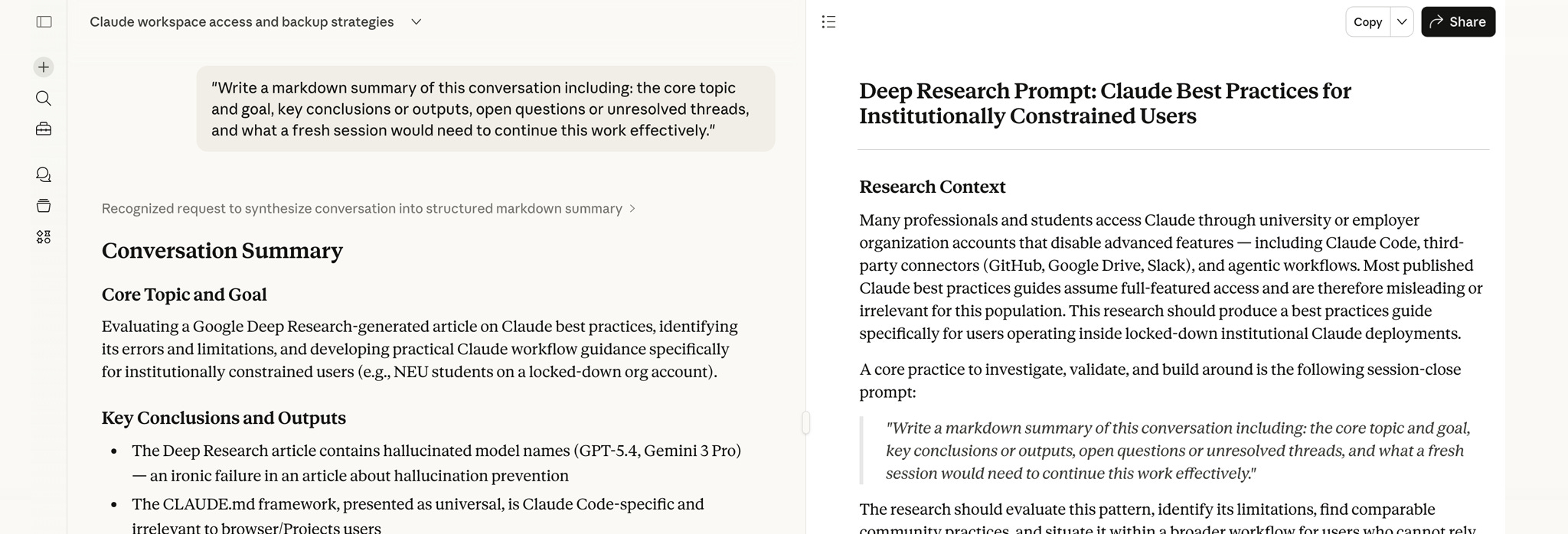
🔁 Run This After Every Important Conversation
Copy and paste this prompt at the end of any session you want to continue:
Write a markdown summary of this conversation including: the core topic and goal, key conclusions or outputs, open questions or unresolved threads, and what a fresh session would need to continue this work effectively.Save the output. Paste it at the start of your next session. This is the single most important habit in the guide that follows.
You are sitting at the most capable research assistant you have ever had. It can read a 200,000-word document in seconds, hold twelve competing hypotheses in parallel, and draft a literature review that would take you three days in forty minutes. You have been working with it for two hours, refining an argument that finally feels right.
Then the session ends.
You open a new tab. The assistant has no memory of the previous two hours. Not a name, not a direction, not the specific constraint you established in the third exchange that changed the entire shape of the work. You are starting from zero.
This is not a bug. It is the architecture. And if you work inside a university or a corporation that manages your AI account—if your login is tied to an institutional SSO, your features are set by a department head, and your data policy was negotiated by a compliance officer you have never met—this stateless machine is the only machine you are getting.
The question is not whether the machine is limited. The question is whether you have built the discipline to work with it anyway.
What “Constrained” Actually Means
Not all Claude accounts are the same, even when they carry the same label.
Anthropic organizes its plans into Free, Pro, Team, and Enterprise tiers. But the meaningful divide for institutional users is not the monthly price—it is the terms of service that govern the account. Team accounts, common in university departments, are governed by the same Consumer Terms that apply to individual Pro subscribers. Enterprise accounts, governed by Commercial Terms, are a different product with a different legal posture.
The practical consequences are specific and often invisible until something goes wrong.
The Pro Trap. Under the framework that took effect in late 2025, Anthropic trains its models on data from consumer accounts—which includes Team plans—unless the user has manually navigated to Privacy Settings and turned off “Help improve Claude.” Most institutional users have never done this. They assume a paid institutional seat comes with business-level privacy. It does not.
The Training Window. For accounts where training is enabled, data retention extends to five years. That is not a typographical error. Five years.
The Connector Gap. Enterprise accounts can index Google Drive, GitHub, Gmail, and Microsoft 365 directly through Claude Connectors. Institutional Team accounts typically cannot—not because the feature doesn’t exist, but because the department’s primary owner has disabled it for security or compliance reasons. You are left with manual file uploads and copy-paste.
The Revocation Problem. When your enrollment ends, when your employment terminates, when the institution switches vendors: your access is gone instantly. There is no grace period guaranteed by policy. The EDUCAUSE literature is explicit that institutions bear no legal obligation to notify users before access termination. Every conversation, every project, every artifact that was not saved locally is gone.
The technical term for this situation is stateless fragility. You have access to extraordinary capability, but the capability belongs to the institution, not to you. The moment you stop being a valid account holder, the desk disappears.
The Attention Budget
Here is what is actually happening when you run a long Claude session.
The transformer architecture at the core of every large language model processes tokens by computing relationships between all tokens in the current context simultaneously. The computational cost of this operation grows quadratically: processing a context of n tokens requires roughly O(n²) operations. As the window fills—even a 200,000-token window—something begins to degrade.
Researchers call it the “lost in the middle” problem. When critical information sits in the middle of a very long conversation, the model begins to lose track of it. Early instructions get diluted. Constraints established in exchange three lose their grip by exchange thirty. The model starts making assumptions that were already settled, re-opening questions that were already closed.
Measured performance drops of around 39% have been documented across generation tasks as conversations lengthen. The model is not lying to you or being careless. It is running out of attention to allocate.
The implication for practical work is this: long sessions are not your friend. The instinct to keep a productive conversation going—to avoid the friction of starting fresh—is working against you. A short, dense, well-scoped session followed by a structured handoff consistently outperforms a three-hour marathon where the model is quietly drowning in its own context.
This is the fundamental insight behind every technique in this guide. You are not managing around a limitation. You are working with the machine’s actual cognitive architecture.
The Handoff Protocol
The session handoff is not a workaround. It is the core workflow.
At the end of every session that matters, you generate a structured summary. That summary becomes the first message of your next session. The model has no memory, but you do—and the handoff document is how you transfer your memory into the machine’s context efficiently.
The failure modes of bad handoffs are documented and consistent.
Recency bias is the most common. Ask a model to summarize a conversation without structure and it will overweight the last twenty exchanges and underweight the constraints established at the beginning. The thing you spent forty minutes establishing in the first hour disappears from the summary.
Over-compression collapses specific technical decisions into vague gestures: “updated the auth module” instead of the precise logic fix and the reason it was chosen over the alternative. The next session has to re-derive the decision.
Hallucinated consensus is the most dangerous. A brainstormed idea that was never finalized gets written into the summary as a conclusion. The successor session builds on a foundation that does not exist.
The prompt that counters all three failure modes:
“Write a markdown summary of this conversation including: the core topic and goal, key conclusions or outputs, open questions or unresolved threads, and what a fresh session would need to continue this work effectively.”
That is the baseline. For technical work—code, architecture, engineering decisions—you need more specificity. The annotated version:
“Act as a Lead Software Architect. Generate a technical handoff document for a new developer who will pick up this work in a fresh session. Include: the current state of the core functions we modified, any libraries or environment variables we identified as critical, the rationale behind the last three logic decisions we made, and the exact prompt I should paste into the next session to resume this task.”
For research and strategy:
“Synthesize our research findings into a strategic handoff. List the core data points we have verified as true. Describe how our initial hypothesis changed during this session. Note where the analysis hit a wall or required more data. Generate a 200-word context packet for a new thread that maintains the current depth of analysis.”
The summary is not a convenience. It is a data packet designed for a specific reader: a fresh instance of Claude with no prior context, a full attention budget, and no bad habits inherited from a fatigued session.
Projects as Cognitive Anchors
Claude Projects solve a different problem than the session handoff. Where the handoff is about carrying state from one session to the next, the Project Instructions field is about carrying structure.
Think of it as the equivalent of a CLAUDE.md file in a code repository. In full-featured Claude Code deployments, practitioners maintain a persistent file that defines coding standards, build commands, and architectural rules—a document the model reads before every session. In the web interface, Project Instructions is that document.
What belongs there is not session-specific. It is the rules that should govern every conversation in the project:
The persona the model should inhabit (“Act as a critical peer reviewer, not a validator”)
The formatting constraints that make outputs useful (“Always structure responses with Problem, Solution, and Trade-offs sections”)
The negative constraints that prevent waste (“Do not use corporate jargon. Do not summarize without being asked. Do not add caveats unless the uncertainty is significant”)
What does not belong there is temporary data—the draft you are working on today, the argument from last week’s session. That is what the handoff document carries.
The distinction matters because Project Instructions occupy a different layer of the context. They are applied before every session. They cannot be diluted by a long conversation the way ordinary context can. They are structural, not informational.
The practical workflow: Project Instructions define the rules. The session handoff carries the state. Together they replace the persistent memory features that institutional accounts often lack.
The Local-First Imperative
Every output you care about lives in one of two places: Anthropic’s servers, or your local machine.
You have control over exactly one of those locations.
The Claude interface does not make exporting easy. The native Export Data function produces a JSON file that is large, unstructured, and difficult to parse. Browser extensions like ClaudeExporter or Lyra can export individual conversations to Markdown, which is the community-standard format for local storage—it preserves code blocks, tables, and headers and is searchable in tools like Obsidian or Notion. If your institutional security policy prohibits third-party extensions, the only remaining option is manual copy-paste into a local markdown editor.
Artifacts—generated code, interactive charts, HTML pages—have a native Download button. The discipline is this: download the final version of every artifact immediately. Artifacts are tied to specific chat sessions. When the session is deleted or the account is revoked, the artifact is gone.
The one-sentence version of the local-first principle: your work lives in your local files, not on Anthropic’s servers.
The corollary: never use Claude as your primary repository for research notes. Use it as a drafting engine. The notes live in Obsidian, or Zotero, or a versioned local directory. Claude generates drafts; you own the versions.
Cross-Model Verification
A single model working alone in a long session develops something like confirmation bias. It has reasoned itself into a position and it tends to defend that position rather than interrogate it.
The session handoff document is the solution here too, but in a different direction. Instead of carrying context forward to a new Claude session, you carry it sideways to a different model.
The technique is called dissent prompting. You take your handoff summary and your output and bring them to a second model—GPT-4o, Gemini, Perplexity—with a specific instruction:
“Identify three potential flaws or edge cases that the previous analysis missed.”
Not: “Is this correct?” That tends to produce agreement. Dissent prompting specifically elicits criticism.
Different tasks route to different verification targets. Factual claims and citations go to Perplexity, which has live web access and can check sources directly. Code logic goes to GPT-4o, which catches hallucinations that are specific to one model’s reasoning patterns. Strategic recommendations go back to a fresh Claude session, which can evaluate whether the argument holds up when presented without the context of the original discussion.
The underlying logic is simple: models make different kinds of mistakes. A finding that survives interrogation by two different architectures is more reliable than a finding that has only ever been seen by one.
The Mental GDPR Check
Before every prompt in an institutional account, ask one question:
If this prompt were published on the front page of the campus newspaper tomorrow, would it cause a compliance violation?
This is not a hypothetical. Institutional owners—department heads, university IT administrators, corporate compliance teams—have access to Audit Logs and Compliance APIs. They can read any conversation at any time. In most institutional deployments, this surveillance capability is enabled by default, not as an exception.
FERPA-protected student data, HIPAA-covered health records, Social Security numbers, payment card information—these are what compliance frameworks call Level 3 data. They should not enter Claude under any account that lacks a formal Data Processing Agreement between the institution and Anthropic. Team accounts typically do not have this agreement. Enterprise accounts typically do.
If you are unsure which tier your account falls under, assume the least protective posture until you confirm otherwise.
The Three Shifts
The institutionally constrained user who figures this out has made three specific transitions.
The first is from history to handoff. Long bloated sessions where you hope the model remembers what happened three hours ago are replaced by short dense sessions bridged by structured Markdown summaries. The session is not a continuous conversation. It is a unit of work with a defined start state and a defined end state.
The second is from cloud to local. The Claude interface is a workspace for work in progress. Every final output is immediately transferred to local, version-controlled storage. The cloud is where you generate. Local is where you keep.
The third is from trust to verification. No single-model output is treated as definitive for high-stakes work. The Markdown summary becomes a portable data packet for cross-verification. The question is not whether the model is wrong, but which kind of wrong might be hiding in the output.
None of these are workarounds. They are how the machine is designed to be used when you understand what the machine actually is: a stateless reasoning engine with a finite attention budget, operating inside an institutional framework that may revoke your access at any time, with no obligation to warn you first.
The desk can disappear. Build accordingly.
Great explanation of stateless AI workflows and the markdown handoff habit is a powerful takeaway.
I find it interesting how working with AI in institutional settings requires discipline, especially since the system doesn’t retain memory and can lose context over time. It makes me think that practices like structured summaries and local storage are essential, not optional, for serious work. The idea of treating AI as a “stateless tool” really changes how I would approach long tasks.