

MARLEY: https://marley.bearbrown.co/
Most website templates give you a starting point and then leave you alone with it.
Marley doesn’t. Marley is a Next.js template built for a specific kind of collaboration: you clone it, you open Claude Code in the directory, and you talk to it. You say what you want. The website changes. You say something else. The website changes again. The website is never finished — it’s a living document that evolves as your needs become clearer.
Here’s what it ships with: a blog system, a tools directory, a Substack importer that pulls your posts (and checks for duplicates, and imports your drafts), and support for animations and D3 graphs that Substack itself can’t render. It’s self-documenting — it can generate a technical reference for its own features, suggest what to build next, and create spec documents for proposed additions. It also exposes Claude prompt tools publicly, so your tools page becomes a real tool directory, not just a list of links.
The workflow is simple. Open the template. Open Claude Code. Tell it who you are and what you don’t need. Remove the blog. Change the brand. Update the links. Connect your Substack. Add your tools. The template becomes your site because you told it to.
Marley is MIT licensed, open source, and built by Nik Bear Brown. It’s the infrastructure for bearbrown.co and the Musinique ecosystem — rebuilt every time a conversation asked it to be different.
Clone it. Talk to it. See what it becomes.
→ GitHub · Built by Nik Bear Brown · The Skepticism AI Substack
Tags: Next.js website template, Claude Code integration, talk-to-your-website, Substack importer Next.js, living document web development
What this document isA reference for the Marley multi-brand Next.js template. It covers what the template contains, how each system is structured, the full database schema, the route map, and the environment variables required for deployment. It closes with five proposed future additions. Use this when navigating an unfamiliar part of the codebase, planning a new feature, or onboarding a second developer.
1. What Marley is
Marley is a production-grade Next.js site template that proves its own flexibility by wearing different costumes. The same codebase is styled for multiple fictional businesses from public domain literature — each with a distinct voice, palette, and copy — without touching routing, components, or infrastructure.
The template demonstrates itself. Each brand instance is a stress test: if Scrooge & Marley’s austere ledger aesthetic and Au Bonheur des Dames’ lush retail warmth can coexist in the same codebase, the theming system is real.
The base codebase was derived from the Medhavy adaptive learning platform (Medhavy LLC, Nik Bear Brown and Srinivas Sridhar). All Medhavy branding has been replaced per brand instance. The infrastructure — routing, admin, database schema, API contracts — is shared and unchanged across instances.
Current brand instances
BrandSourceIndustry (fictional)StatusScrooge & MarleyDickens, A Christmas Carol, 1843Counting house, money lendingLiveAu Bonheur des DamesZola, Au Bonheur des Dames, 1883Department store, retailPlannedLapham PaintHowells, The Rise of Silas Lapham, 1885Industrial paint manufacturingPlannedDotheboys HallDickens, Nicholas Nickleby, 1839Education (cautionary)Planned
All source works are public domain. The brands as implemented — copy, design, codebase — are not.
2. Tech stack
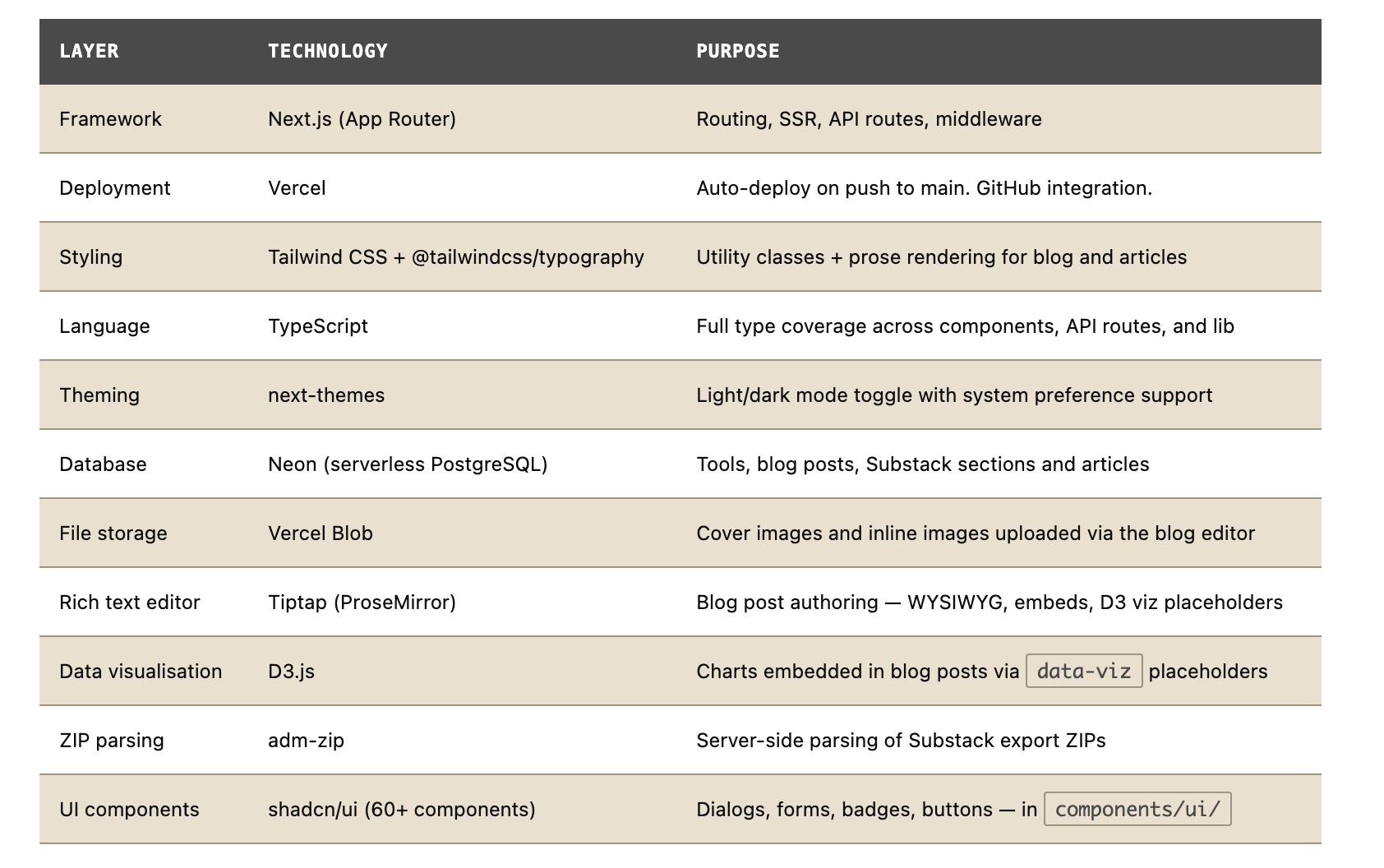
3. Multi-brand theming system
The theming system is the core architectural claim of the Marley template. Changing a brand requires editing three files. No component changes. No routing changes. The entire site repaints.
The three files that must stay in sync
lib/theme.ts
TypeScript source of truth
Exports a typed theme constant containing the brand name, tagline, address, contact, domain, and the eight colour values (bb1–bb8). This is the canonical source. If it conflicts with the other two files, this one wins.
public/theme.json
Machine-readable
Same data as lib/theme.ts, serialised as JSON. Read by Indiana (the doc generator) and any external tooling that needs palette values without importing TypeScript. Includes a colorRoles field describing the semantic role of each colour variable.
app/globals.css
CSS variables
The :root block defines --bb-1 through --bb-8. A matching .dark block inverts the parchment/soot relationship for dark mode. All components reference these variables — no hex values appear in component files.
Palette variable roles (mandatory conventions)
VariableRoleScrooge & Marley value--bb-1Primary text#0D0D0D — soot black--bb-2Primary accent, headers#4A4A4A — iron grey--bb-3Danger, overdue, emphasis#8B0000 — dried-ink red--bb-4Highlight, callout#8B7536 — cold brass--bb-5Secondary accent#2F2F2F — charcoal--bb-6Muted accent, labels#6B6B5E — tarnished pewter--bb-7Borders, subtle backgrounds#9C9680 — aged ledger tan--bb-8Page background, light surfaces#E8E0D0 — parchment
WCAG AA contractWCAG AA requires 4.5:1 contrast for body text and 3:1 for large text. When replacing palette values for a new brand, verify --bb-1 against --bb-8 and --bb-2 against --bb-8 before deploying. Many brand primaries fail at body text size.
4. Site structure and routes
Public routes
/Home — five sections: hero, services, who we serve, CTA, contact
/toolsTools directory — card grid merging filesystem artifacts and DB link tools
/tools/[slug]Artifact embed page — full-viewport iframe with title bar
/devDev docs browser — searchable card grid, filesystem-driven
/dev/[slug]Single dev doc — full-viewport iframe
/blogBlog feed — cover thumbnails, search bar, published posts newest first
/blog/[slug]Blog post — cover hero, prose content, og:image, prev/next nav
/aboutFirm/person page — prose format, founders, contact
/privacyPrivacy policy
/privacy/cookiesCookie policy — dedicated page
/terms-of-serviceTerms of service
/substackNewsletter hub — card grid of all sections
/substack/[section]Section page — article list, follow CTA
/substack/[section]/[slug]Full article — attribution banner, prose, subscribe CTA
Admin routes (protected)
/admin/loginPassword form — POSTs to /api/admin/login
/admin/dashboardOverview — tabbed nav to all admin sections
/admin/dashboard/blogPost list — tag filter, bulk delete, import/export
/admin/dashboard/blog/newNew post editor
/admin/dashboard/blog/[id]/editEdit existing post
/admin/dashboard/blog/importImport — Substack ZIP or blog export ZIP
/admin/dashboard/toolsTools manager — link and artifact types
/admin/dashboard/devDev docs list — filesystem browser with sync button
/admin/dashboard/substackSubstack section manager — create sections, import ZIPs
5. Content systems
Blog system
The blog system uses Neon PostgreSQL for post storage, Tiptap for authoring, and Vercel Blob for image storage. Posts are database-driven; the admin editor produces clean HTML stored in the content column.
Key capabilities
WYSIWYG editor: bold, italic, headings, lists, blockquotes, code blocks, images, YouTube embeds, D3 viz placeholders
Cover image upload via drag/drop to Vercel Blob
Tags stored as PostgreSQL
TEXT[]array — filterable in both admin and public viewsDraft/publish workflow with
published_attimestampAuto-generated slug from title (editable), auto-generated excerpt (first 200 chars)
Export as ZIP (
posts.json+ individual HTML files) — enables cross-instance transferImport from Substack export ZIP or blog export ZIP
D3 data visualisations hydrated client-side via
BlogVizHydratorand the viz registry
Adding a D3 visualisation
Create
lib/viz/[name].tsexportingdefault (el: HTMLElement) => voidAdd an entry to
lib/viz/registry.tsmapping the name to a lazy importInsert a
data-viz="[name]"placeholder via the editor toolbar
Tools directory
Tools are served from two sources merged at render time. Artifact tools live as HTML files in public/artifacts/ — filesystem is the source of truth, no database entry needed. Link tools are database-driven, managed via the admin UI.
Two tool types
TypeSourceBehaviourHow to addartifactFilesystem (public/artifacts/)Card links to /tools/[slug], renders in full-viewport iframeDrop an HTML file with title, description, keywords meta tags. Push to main.linkNeon databaseCard opens URL in new tabAdmin UI at /admin/dashboard/tools
Dev docs browser
All HTML files in public/dev/ are automatically surfaced on /dev. No database, no sync required. The lib/html-meta.ts utility (scanHtmlDir()) reads <title>, <meta name="description">, and <meta name="keywords"> tags from every file and returns them as HtmlDocMeta[].
All three meta tags are requiredA doc without all three tags does not appear in the browser with correct title or searchable keywords. A doc that appears in the filesystem but cannot be found by search does not exist to the reader. Title, description, and keywords are structural requirements, not formatting suggestions.
Substack importer
The Substack import system ingests Substack export ZIPs and surfaces articles under /substack/[section]/[slug]. Articles are stored in Neon with attribution preserved.
Import workflow
Export from Substack (Settings → Exports → Create new export)
Create a section in admin dashboard (title, slug, Substack URL, description)
Upload the ZIP to that section — parser reads
posts.csv+ HTML filesArticles upserted by slug — re-import is safe, updates existing records
6. Database schema
Four tables in Neon PostgreSQL. All have row-level security enabled. Public read policies are narrowly scoped — blog posts require published = true.
-- Tools
CREATE TABLE IF NOT EXISTS tools (
  id UUID PRIMARY KEY DEFAULT gen_random_uuid(),
  name TEXT NOT NULL,
  slug TEXT UNIQUE NOT NULL,
  description TEXT,
  tool_type TEXT DEFAULT 'link',       -- 'link' | 'artifact'
  claude_url TEXT,                      -- external URL (link tools) or fallback
  chatgpt_url TEXT,                     -- optional ChatGPT URL
  artifact_id TEXT,                     -- Claude artifact UUID
  artifact_embed_code TEXT,             -- raw iframe embed (overrides artifact_id)
  tags TEXT[],                          -- category tags
  created_at TIMESTAMPTZ DEFAULT NOW(),
  updated_at TIMESTAMPTZ DEFAULT NOW()
);
ALTER TABLE tools ENABLE ROW LEVEL SECURITY;
CREATE POLICY "public_read_tools" ON tools FOR SELECT USING (true);
CREATE POLICY "service_role_tools" ON tools FOR ALL USING (true) WITH CHECK (true);

-- Blog posts
CREATE TABLE IF NOT EXISTS blog_posts (
  id UUID PRIMARY KEY DEFAULT gen_random_uuid(),
  title TEXT NOT NULL,
  subtitle TEXT,
  slug TEXT NOT NULL UNIQUE,
  byline TEXT,
  cover_image TEXT,
  content TEXT NOT NULL,               -- clean HTML from Tiptap
  excerpt TEXT,                        -- auto-generated, first 200 chars
  published BOOLEAN DEFAULT false,
  published_at TIMESTAMPTZ,
  tags TEXT[] DEFAULT '{}',
  created_at TIMESTAMPTZ DEFAULT NOW(),
  updated_at TIMESTAMPTZ DEFAULT NOW()
);
ALTER TABLE blog_posts ENABLE ROW LEVEL SECURITY;
CREATE POLICY "public_read_published_posts" ON blog_posts
  FOR SELECT USING (published = true);
CREATE POLICY "service_role_posts" ON blog_posts
  FOR ALL USING (true) WITH CHECK (true);

-- Substack sections
CREATE TABLE IF NOT EXISTS substack_sections (
  id UUID PRIMARY KEY DEFAULT gen_random_uuid(),
  slug TEXT NOT NULL UNIQUE,
  title TEXT NOT NULL,
  description TEXT,
  substack_url TEXT NOT NULL,
  article_count INTEGER DEFAULT 0,
  created_at TIMESTAMPTZ DEFAULT NOW(),
  updated_at TIMESTAMPTZ DEFAULT NOW()
);
ALTER TABLE substack_sections ENABLE ROW LEVEL SECURITY;
CREATE POLICY "public_read_sections" ON substack_sections FOR SELECT USING (true);
CREATE POLICY "service_role_sections" ON substack_sections
  FOR ALL USING (true) WITH CHECK (true);

-- Substack articles
CREATE TABLE IF NOT EXISTS substack_articles (
  id UUID PRIMARY KEY DEFAULT gen_random_uuid(),
  section_id UUID NOT NULL REFERENCES substack_sections(id) ON DELETE CASCADE,
  slug TEXT NOT NULL,
  title TEXT NOT NULL,
  subtitle TEXT,
  excerpt TEXT,
  content TEXT,
  original_url TEXT,
  published_at TIMESTAMPTZ,
  display_date TEXT,
  created_at TIMESTAMPTZ DEFAULT NOW(),
  UNIQUE(section_id, slug)
);
ALTER TABLE substack_articles ENABLE ROW LEVEL SECURITY;
CREATE POLICY "public_read_articles" ON substack_articles FOR SELECT USING (true);
CREATE POLICY "service_role_articles" ON substack_articles
  FOR ALL USING (true) WITH CHECK (true);
Pending migrations (safe to re-run)
-- Run these in Neon SQL Editor if not already applied
ALTER TABLE blog_posts ADD COLUMN IF NOT EXISTS byline TEXT;
ALTER TABLE blog_posts ADD COLUMN IF NOT EXISTS tags TEXT[] DEFAULT '{}';
ALTER TABLE blog_posts ADD COLUMN IF NOT EXISTS cover_image TEXT;
7. Admin system
The admin dashboard is protected by middleware.ts, which redirects all /admin/dashboard/* routes to /admin/login if no valid admin_session cookie is present. Authentication is password-only — the password is set via the ADMIN_PASSWORD environment variable.
Session mechanics
Login: POST to
/api/admin/login— validates againstADMIN_PASSWORDenv varOn success: sets
admin_sessionhttpOnly cookie, 7-day expiryAll
/api/admin/*routes checkisAdmin()fromlib/admin-auth.tsbefore proceedingMiddleware protects dashboard pages; API routes protect data endpoints separately
Admin API routes
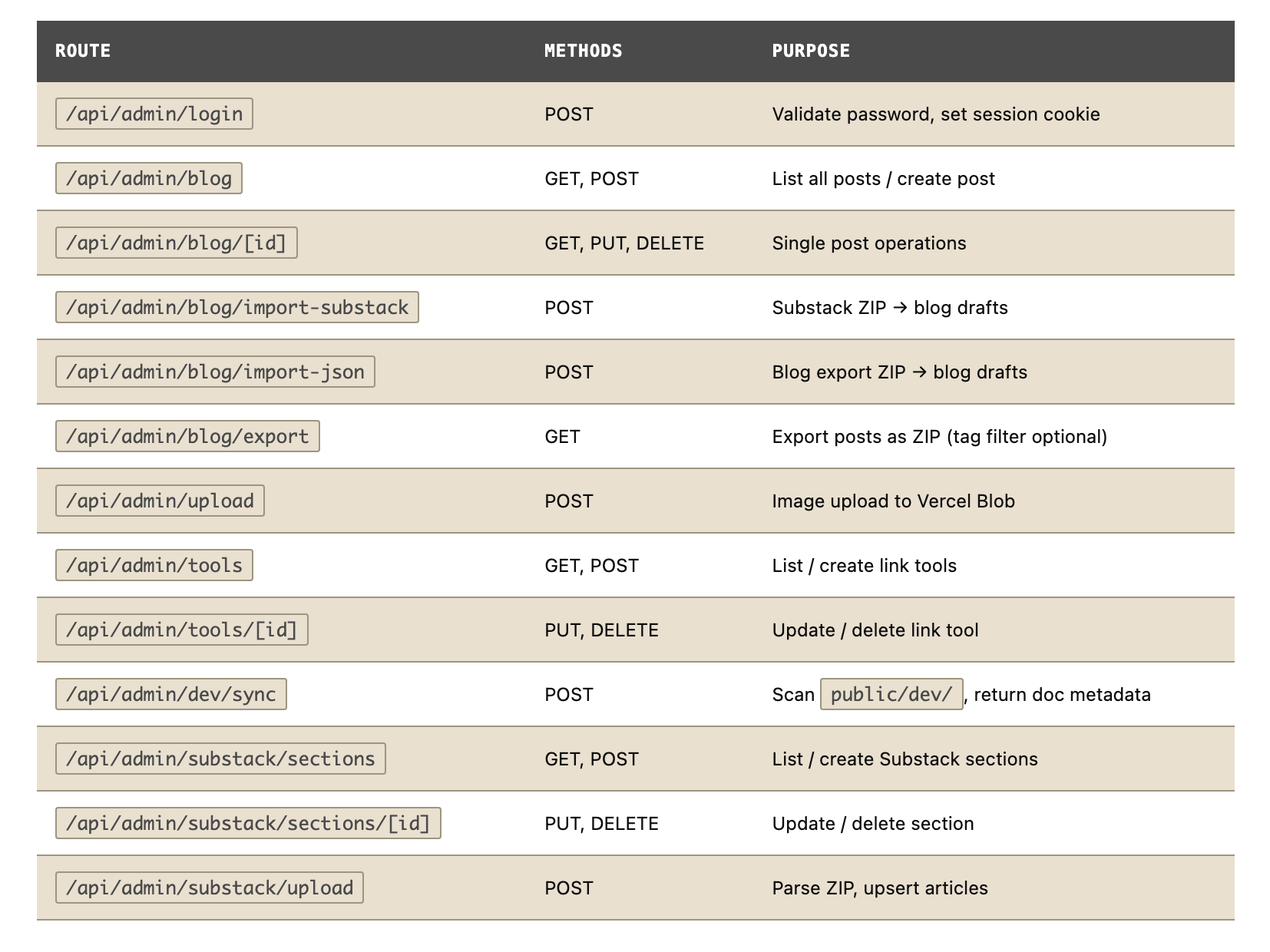
8. Environment variables
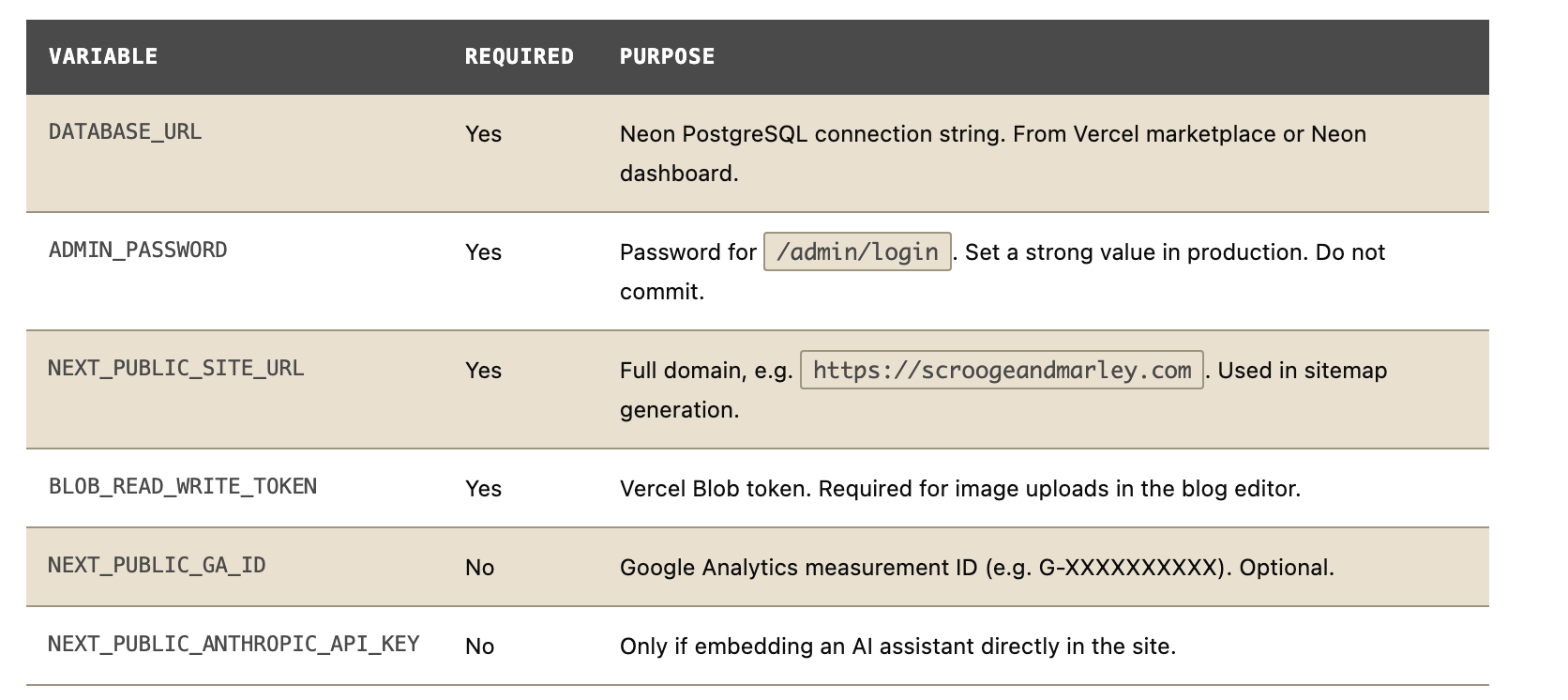
9. Persistent layout components
Header
Sticky, z-50, backdrop-blur. Logo (theme-aware SVG or text), five-item nav, social icon buttons, dark/light mode toggle. Mobile hamburger menu at the lg breakpoint. Do not add a sixth nav item without a deliberate information architecture decision — five is not arbitrary.
Footer
Four-column grid: firm info (name, address, contact), platform links, connect/social links, legal links. Bottom bar with copyright. Column headings and link text are brand-specific copy — the only footer content that changes between instances.
SEO infrastructure
app/sitemap.ts— dynamic sitemap including all/blog/*,/tools/*,/substack/*routes from Neon. Falls back to static-only if DB is not configured.app/robots.ts— allows all crawlers, blocks/admin/and/api/, points to/sitemap.xml.Blog posts include
og:imageandtwitter:cardmeta tags.
10. Five proposed additions
These are structural proposals, not implementation tickets. Each one addresses a real gap in the current template. They are ordered by the ratio of effort to usefulness, not by complexity.
1. Brand registry — single-file multi-instance configuration
Planned
The gap
Currently, switching brand instances requires manual edits to three files (lib/theme.ts, public/theme.json, app/globals.css) plus the home page, legal pages, and CLAUDE.md. There is no single file that declares “this is the Scrooge & Marley instance.” A developer making a new instance must know which files to change.
The proposal
Add a config/brand.ts file that is the single source of truth for the active brand: palette, copy, address, legal entity, home page section content. The three theme files and the legal pages are generated from it, not maintained separately. A new brand instance is one file plus assets.
What it unlocks
A developer could drop in a new brand config, run a generation script, and have a fully configured instance in minutes. The multi-brand demonstration becomes something a user can try themselves, not just read about.
2. Contact form with Resend integration
Planned
The gap
Every CTA on the current site routes to a mailto: link. This means a visitor must have a configured email client. On mobile this works; in many corporate environments it does not. There is also no record of enquiries — they land in an inbox and may be lost.
The proposal
Add a /contact route (currently a placeholder) with a form that POSTs to /api/contact. The API route validates the fields and sends via Resend (one environment variable, generous free tier). Store a copy of each submission in a new enquiries table in Neon. Surface them in the admin dashboard.
What it unlocks
The site becomes genuinely functional as a business template, not just a demonstration. Each brand instance gets a working enquiry pipeline. The admin can see all submissions without checking email.
3. Brand instance switcher in the admin dashboard
Planned
The gap
The multi-brand story is the template’s primary selling point, but it is invisible to someone looking at a single deployed instance. To see the contrast between Scrooge & Marley and Au Bonheur des Dames, you must visit two different URLs — or read about it in a README.
The proposal
Add a brand switcher to the admin dashboard (hidden from public visitors) that live-previews any configured brand instance by swapping the CSS variables via a data-brand attribute on the root element. No page reload. The switcher reads all brand configs from the proposed registry and renders a dropdown.
What it unlocks
The demo becomes interactive. A developer evaluating the template can experience the full range of brand personalities in a single session, on a single deployment. This is the clearest possible argument for the theming system’s real flexibility.
4. Structured projects / portfolio section
Planned
The gap
/projects is currently a placeholder. The tools directory serves individual interactive tools, and the blog serves written content, but there is no structured way to present a body of work — a case study, a client engagement record, a research project — as a coherent unit with multiple components.
The proposal
Add a projects table in Neon with title, slug, summary, status, tags, and a content field (same HTML-from-Tiptap pattern as blog posts). A project can reference multiple blog posts, tools, and external links. The public /projects page renders as a card grid; /projects/[slug] renders the full project with linked artefacts.
What it unlocks
For an individual or consultancy using the template, this closes the gap between “I have blog posts” and “I have a portfolio.” For the multi-brand demonstration, it gives each fictional firm a place to show completed engagements.
5. Indiana — automated dev doc generation from CLAUDE.md
Planned
The gap
Every doc in public/dev/ is hand-authored. The CLAUDE.md file contains authoritative, structured information about the codebase — site structure, schema, routes, environment variables — that duplicates what the dev docs cover. When CLAUDE.md changes, the dev docs become stale. There is no automated connection between the two.
The proposal
Indiana is a lightweight script (scripts/indiana.ts) that reads CLAUDE.md and public/theme.json, extracts structured sections, and generates or regenerates specific dev doc HTML files in public/dev/. It does not replace hand-authored docs — it generates the reference docs (schema, routes, environment variables) that are purely derived from source truth and should not require manual maintenance.
What it unlocks
The dev docs stay current automatically. A change to the database schema in CLAUDE.md is reflected in the dev docs on the next build. The hand-authored explanation and how-to docs remain under human control; the reference docs are generated. This is the documentation-as-code pattern applied to the template itself.


